Best File Formats for Printing: Choosing the Right Format for Professional Results
When it comes to producing high-quality printed materials, design quality is only one part of the equation. The file format you choose can significantly impact the final result. Even a perfectly designed brochure, business card, banner, or book can appear blurry, pixelated, or incorrectly colored if it is exported in the wrong format.
Understanding the best file formats for printing helps businesses, designers, marketers, and publishers achieve consistent and professional results. Different file formats are designed for different purposes. Some are optimized for digital screens, while others are specifically developed to maintain quality throughout the printing process.
Whether you are preparing artwork for commercial printing, publishing a book, creating marketing materials, or designing large-format signage, selecting the right file format is essential. This guide explains everything you need to know about print-ready file formats, how they work, and which format is best for different printing applications.
> Why Print Files Get Low Quality After Printing: Common Causes & Solutions
>What is Bleed and Trim in Printing? Complete Guide for Designers and Businesses
Why File Format Matters in Printing
Many people focus on design software, fonts, colors, and images while overlooking the importance of file format selection. However, printers rely heavily on the file structure to reproduce artwork accurately.
A file format determines how images, text, color profiles, vector elements, and layout information are stored. If the format cannot preserve these elements properly, quality issues may occur during production.
Professional printing requires files that maintain image clarity, preserve typography, support accurate color reproduction, and remain scalable without distortion. Choosing the wrong format can result in unexpected changes that negatively affect the finished product.
The file format acts as a bridge between your design and the printing press. A strong bridge ensures every detail transfers correctly, while a weak one can cause expensive printing mistakes.
Understanding Raster and Vector File Formats
Before discussing specific formats, it is important to understand the difference between raster and vector graphics.
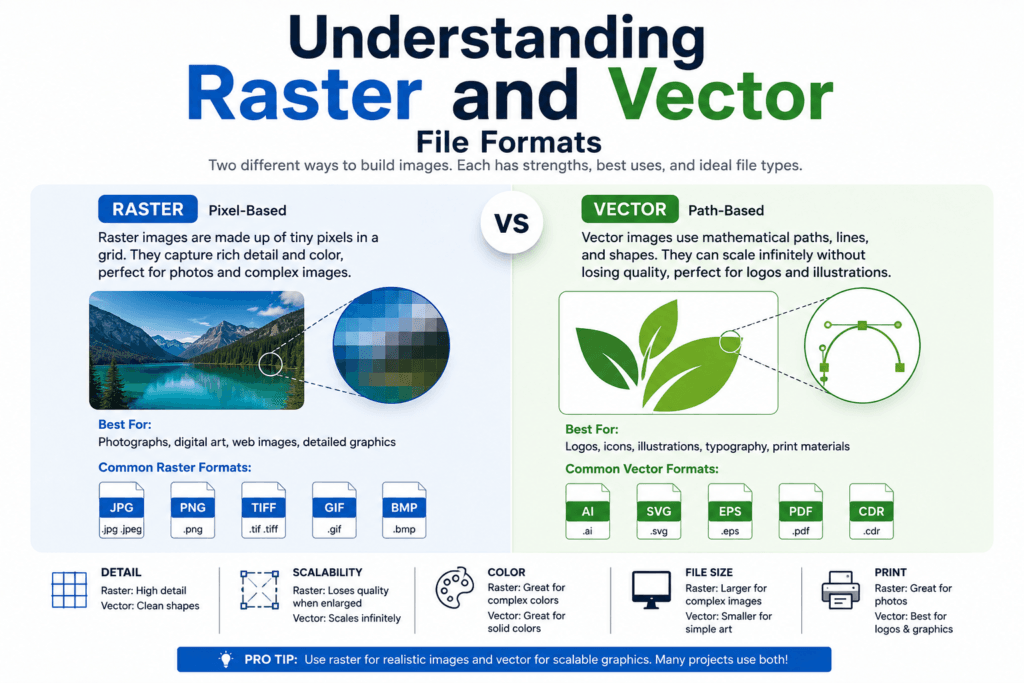
Raster graphics are created using pixels. Every image consists of thousands or millions of tiny colored squares arranged together to form a picture. Common raster formats include JPEG, PNG, TIFF, and PSD.
Raster files work exceptionally well for photographs because they can capture fine details and color variations. However, enlarging raster images beyond their original size often causes quality loss and pixelation.
Vector graphics are built using mathematical paths rather than pixels. Formats such as EPS and AI belong to this category.
Because vector graphics rely on mathematical calculations, they can be resized indefinitely without losing quality. This makes them ideal for logos, illustrations, packaging designs, and large-format printing.
Understanding whether your project relies on raster or vector artwork helps determine the most suitable file format.
Why PDF Is Considered the Best File Format for Printing
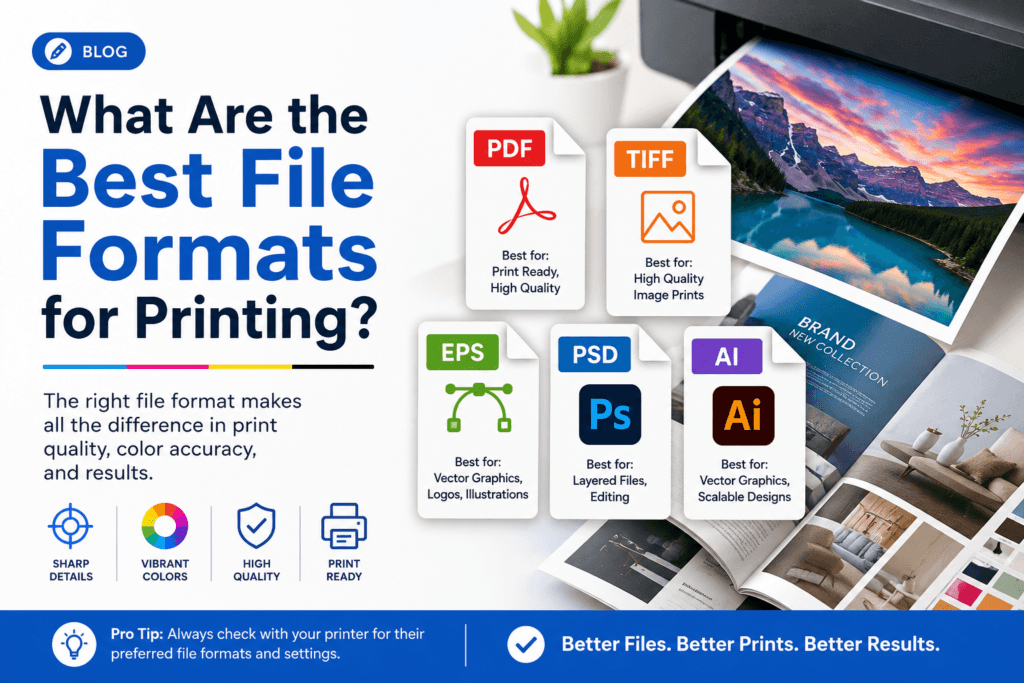
Among all available formats, PDF has become the industry standard for commercial printing. Most professional printing companies request PDF files because they offer an excellent balance between quality, compatibility, and reliability.
PDF files preserve the original layout regardless of the computer, operating system, or software used to open them. Fonts remain embedded, images stay intact, and design elements maintain their original positions.
One of the biggest advantages of PDF is its ability to combine text, vector graphics, and high-resolution images within a single file. This makes it suitable for virtually every type of print project.
Professional printers also appreciate PDF files because they support bleed settings, crop marks, color profiles, and other technical requirements necessary for commercial printing.
From brochures and flyer to books and packaging, PDF remains the safest and most universally accepted format available today.
The Role of TIFF in Professional Printing
TIFF is widely recognized as one of the highest-quality image formats available for print production.
Unlike compressed formats that sacrifice image information to reduce file size, TIFF preserves nearly all image data. This allows printers to reproduce photographs and artwork with exceptional detail and accuracy.
Professional photographers often use TIFF files when delivering images for banner, books, art exhibitions, and advertising campaigns. The format supports high color depth and maintains image integrity even after multiple edits and saves.
The primary drawback of TIFF files is their size. Because they store so much information, they require significantly more storage space than formats such as JPEG.
Despite this limitation, TIFF remains one of the best choices whenever image quality is more important than file size.
Why EPS Remains Important for Print Design
EPS has been a cornerstone of professional printing for many years. Although newer formats have emerged, EPS continues to play an important role in commercial design workflows.
The greatest strength of EPS lies in its vector capabilities. Logos, illustrations, icons, and branding elements often need to appear on a wide range of materials, from small cards to massive outdoor billboards.
An EPS file can scale to any size while maintaining perfectly sharp edges and smooth curves. This flexibility makes it invaluable for businesses that require consistent branding across multiple print formats.
Many printers still request EPS files for logo submissions because they provide maximum scalability and compatibility.
For companies investing in long-term brand identity, maintaining master logo files in EPS format remains a best practice.
How Adobe Illustrator Files Support Professional Printing
Adobe Illustrator files, commonly saved as AI files, are among the most widely used formats in the design industry.
AI files allow designers to create and edit vector artwork with complete flexibility. Since vectors can be resized infinitely without quality loss, Illustrator is often the preferred software for branding, packaging, signage, and promotional materials.
While AI files are highly valuable during the design stage, many printers request PDF exports for final production. Nevertheless, maintaining original AI files ensures future edits can be made without compromising quality.
For businesses that frequently update marketing materials, AI files provide a reliable source file for ongoing revisions and improvements.
The Importance of PSD Files in Print Production
PSD is the native format used by Adobe Photoshop. It is particularly useful for image-heavy projects that require extensive editing.
Unlike flattened image formats, PSD files preserve layers, masks, filters, text elements, and adjustment settings. This allows designers to make changes without starting over from scratch.
Large advertising campaigns, posters, banners, and photo-based marketing materials often begin as PSD files before being exported into print-ready formats.
Although PSD files are excellent working documents, they are not always the preferred format for final printing. Designers typically convert them into PDF or TIFF files before sending them to production.
This workflow combines the editing flexibility of PSD with the printing reliability of PDF or TIFF.
Why JPEG Is Not Always the Best Choice for Printing
JPEG is one of the most common image formats in the world. It is widely used because it creates relatively small file sizes while maintaining acceptable visual quality.
For digital use, JPEG performs extremely well. Websites, social media platforms, and online advertisements frequently rely on JPEG images because they load quickly.
Printing, however, presents different challenges.
JPEG uses lossy compression, meaning image information is permanently discarded whenever the file is compressed. As compression increases, image quality gradually decreases.
While high-resolution JPEG files can produce acceptable print results, repeated editing and saving can introduce visible artifacts that reduce clarity.
For professional commercial printing, JPEG should generally be considered a secondary option rather than the primary choice.
Understanding PNG for Printing Applications
PNG is another popular image format, especially in digital design.
Its biggest advantage is support for transparent backgrounds. This feature makes PNG files extremely useful for logos, product mockups, presentations, and website graphics.
Although PNG offers better quality preservation than JPEG, it lacks some of the advanced print-focused capabilities found in PDF and TIFF formats.
For professional print production, PNG is usually used as a supporting format rather than the final print-ready file.
Designers often use PNG files during the creative process before exporting projects into formats better suited for commercial printing.
Choosing the Right File Format for Different Print Projects
The ideal format depends on the nature of the project.
Books, brochures, catalogs, annual reports, and corporate documents typically perform best as PDF files because they combine text, graphics, and images efficiently.
Photography-focused projects often benefit from TIFF files because they preserve maximum image detail.
Logos, branding assets, and illustrations are best maintained in EPS or AI formats due to their scalability.
Complex image editing projects usually begin in PSD format before being converted into print-ready files.
Understanding these distinctions helps businesses avoid costly production errors while achieving superior print quality.
Conclusion
Selecting the best file formats for printing is one of the most important decisions in the print production process. While multiple formats serve different purposes, PDF continues to lead as the most versatile and printer-friendly option for commercial printing.
TIFF remains unmatched for high-resolution photography, while EPS and AI provide exceptional scalability for logos and vector artwork. PSD supports advanced editing workflows, and JPEG and PNG play useful roles in specific situations.
Understanding how each format works allows businesses, designers, and publishers to make informed decisions that improve print quality, reduce production issues, and maximize the value of every printing project. Investing time in choosing the right file format ultimately leads to sharper images, more accurate colors, and professional results that leave a lasting impression.
Frequently Asked Questions
What is the best file format for printing?
PDF is generally considered the best file format for printing because it preserves fonts, layouts, images, and color settings accurately.
Is TIFF better than JPEG for printing?
Yes. TIFF maintains significantly higher image quality because it uses little or no compression, making it ideal for professional printing.
Why do commercial printers prefer PDF files?
PDF files maintain design consistency, support embedded fonts, and work reliably across different systems and printing equipment.
What file format should a logo be for printing?
EPS and AI are the best formats for printed logos because they are vector-based and can scale without losing quality.